
Category Archives: Data Centers
Colocation Pricing Models Explained: Space, Power, and Bandwidth Costs
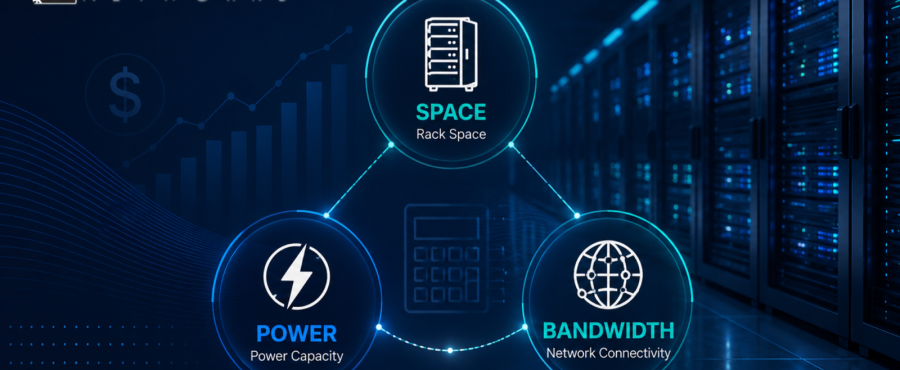
Colocation pricing can be difficult to compare because the monthly rate is rarely based on one factor alone. A colocation facility may quote space, power, cooling, bandwidth, security, support, and connectivity in different ways. For businesses evaluating services, the goal is not simply to find the lowest monthly cost. The better question is whether the pricing model matches the way the infrastructure actually operates. Below, LightWave Networks explains different factors related to colocation and pricing.
What Drives Colocation Pricing?
Colocation is the practice of placing company-owned servers or networking equipment inside a third-party data center. The organization keeps control of its hardware and systems, while the facility provides the physical environment needed to keep that equipment operating.
Most pricing models begin with the amount of space required, then adjust based on power capacity, power usage, bandwidth, cross-connects, support, contract length, redundancy requirements, and managed services. A low entry price may not include enough power, bandwidth, support, or expansion room. A higher base price may be more practical if it includes the infrastructure capacity the business will actually need.
Space Pricing
Colocation space pricing usually depends on how much physical room the customer needs inside the facility. Smaller deployments may be priced by rack unit, while larger environments may use a half cabinet, full cabinet, cage, or private suite model.
A rack-unit model can work for a business that only needs one or a few servers. A cabinet, cage, or suite model may be more appropriate when the deployment includes multiple servers, network appliances, storage devices, compliance needs, or future expansion plans.
Power Pricing
Power is often one of the biggest variables in data center colocation pricing because it affects both capacity and facility operations. Servers need reliable power delivery, power distribution, cooling support, and redundancy appropriate to the workload.
Some providers price power as a committed amount of capacity, while others may account for actual usage, blended power, or density-based power tiers. If the power model does not match the equipment profile, the business may run into added charges, limited growth, or deployment redesign.
Bandwidth Pricing
Bandwidth pricing reflects how data moves between the colocation environment, users, cloud services, business locations, partners, and the public internet. Some agreements include a set amount of bandwidth, while others price bandwidth separately based on committed capacity, usage, port speed, or burstable models.
A business with steady traffic may prefer a predictable bandwidth commitment. A business with variable traffic may need a model that supports bursts without creating unnecessary monthly overhead. Bandwidth should also be evaluated alongside carrier access and cross-connect needs, especially when the deployment connects to cloud platforms, carriers, partners, or internal sites.
What Other Costs Affect Pricing?
Space, power, and bandwidth form the core of most colocation pricing models, but they are not the only cost drivers. Buyers should also review setup fees, cross-connect charges, remote hands support, equipment receiving, installation support, managed networking, and disaster recovery options.
These costs are not automatically negative. Remote hands support can reduce the need to send staff to the facility for basic equipment tasks. Managed networking and disaster recovery support can also provide value when the colocation environment is part of a broader infrastructure strategy.
A pricing model should make clear what is included, what is optional, and what could change as usage grows. Hidden assumptions create budget friction later, especially when teams compare only the base monthly rate.
How Should Businesses Compare Colocation Pricing Models?
A useful colocation pricing comparison starts with the workload, not the quote. The business should understand what equipment is being deployed, how much space it needs, how much power it draws, what level of redundancy is required, how traffic behaves, and whether future growth is likely.
From there, each proposal can be reviewed for practical fit. Does the space model leave room for expansion? Is the power allocation a match the hardware profile? Does the bandwidth model reflect normal and peak traffic? Are cross-connects, support, and managed services clearly defined?
This approach helps teams avoid overbuying infrastructure that will sit unused or underbuying capacity that the environment cannot support efficiently.
Choosing a Colocation Model That Fits the Business
The best colocation pricing model aligns facility capabilities with business requirements. Space determines where the equipment lives. Power determines whether the environment can support the hardware safely and reliably. Bandwidth determines how effectively the infrastructure connects to users, applications, cloud services, and other network destinations.
LightWave Networks provides colocation services designed to support businesses that need secure data center space, reliable infrastructure, and connectivity planning. If your organization is comparing colocation options, start with a deployment review that accounts for space, power, bandwidth, support needs, and future growth. Contact us today to discuss a colocation model built around your infrastructure requirements.
Colocation Pricing FAQs
What affects colocation pricing the most?
Colocation pricing is usually affected most by space, power, bandwidth, connectivity, redundancy, and support requirements. Different colocation facilities may structure those costs differently. This is why businesses should compare the full deployment model rather than only the base monthly rate.
Is colocation pricing based only on rack space?
No. Rack space is usually one part of the quote. However, colocation pricing also depends on power capacity, bandwidth, cooling needs, support, contract terms, and connectivity.
How should a business compare colocation pricing models?
A business should compare colocation pricing models by reviewing the full deployment profile. This includes space needs, power draw, bandwidth patterns, redundancy requirements, support needs, and future growth.
RELATED READINGS:
VPS vs. VDS vs. Colocation: How to Choose for Enterprise Growth

Understanding Liquid Cooling, Power, and Redundancy in Colocation Facilities
Modern infrastructure demands have shifted fast. High-density compute, AI training clusters, and advanced cooling strategies like liquid coolingare no longer edge cases. They are becoming baseline requirements. At Lightwave Networks, this shift is shaping how colocation facilities are designed to support GPU colocation, AI server colocation, and sustained high-performance workloads.
Understanding how these systems are designed, and more importantly, how they work together, is what separates a facility that simply houses equipment from one that is built to support modern, high-density infrastructure.
Why Power Infrastructure Is the First Constraint
Power availability is often the limiting factor in high-density deployments. A traditional rack might operate comfortably at lower kilowatt ranges. However, AI and GPU clusters can push far beyond that, especially in GPU hosting environments where multiple accelerators are stacked within a single footprint.
A facility designed for modern workloads must go beyond simple capacity. It needs structured power redundancy that can maintain uptime during failure events without introducing instability during load transitions.
A redundant power supply design typically follows models such as N+1 or 2N. In practice, that means there is at least one independent backup path for power delivery, or in higher-tier environments, a fully mirrored system that can carry the entire load if one path fails.
The difference becomes critical during real-world scenarios. A single power path failure in a non-redundant system can result in immediate downtime. In a properly designed data center power redundancy model, the failover is handled without interruption, assuming the load is balanced correctly and the infrastructure is maintained.
For organizations running latency-sensitive or compute-intensive workloads, this is not just a reliability feature. It is a performance safeguard.
Cooling Is No Longer Secondary to Power
Cooling used to be treated as a supporting system. That is no longer the case. As rack densities increase, cooling capacity and efficiency become just as important as power delivery.
Air cooling still plays a role, but it has limits. As heat output rises, air-based systems can struggle to maintain consistent temperatures across densely packed hardware. This is where liquid cooling becomes increasingly important for high-density colocation facilities.
Liquid cooling systems are designed to remove heat more efficiently by transferring it directly from high-output components. In liquid-cooled GPU environments, this can dramatically improve thermal stability, especially during sustained workloads like AI training or inference at scale.
However, not every environment requires full liquid cooling, and not every GPU setup benefits equally. Hybrid approaches are common, where air cooling handles baseline loads while liquid systems are deployed for high-density zones.
The key is not the presence of liquid cooling alone, but how it integrates with a broader cooling redundancy strategy.
What Cooling Redundancy Actually Looks Like
Cooling redundancy is often misunderstood as simply having extra equipment. In reality, it is about maintaining environmental stability during failure conditions.
A redundant cooling system might include additional chillers, backup pumps, or independent cooling loops that can take over if a primary system fails. The goal is to prevent temperature spikes that could trigger hardware throttling or shutdowns.
In high-density environments, even a short disruption in cooling can have cascading effects. GPUs and CPUs may reduce performance to protect themselves, which impacts workload completion times and overall system efficiency.
This is where system redundancy and system design intersect. A well-designed colocation facility anticipates these failure points and ensures that cooling transitions happen smoothly, without introducing thermal shock or uneven distribution.
Power and Cooling Must Be Designed Together
One of the most overlooked aspects of colocation design is the relationship between power delivery and cooling systems. These systems are deeply interconnected.
Higher power density increases heat output. Increased heat requires more aggressive cooling. More aggressive cooling demands additional power. Without careful planning, this creates a feedback loop that can strain both systems.
Colocation facilities built for modern workloads are designed with this relationship in mind. Power distribution units, cooling capacity, and airflow or liquid pathways are coordinated to support consistent performance across varying load conditions.
This becomes especially important in environments supporting GPU server colocation and AI workloads, where both electrical and thermal loads can fluctuate rapidly based on demand.
The Role of Redundant Systems in Uptime and Performance
Redundancy is often framed as a safeguard against downtime. That is true, but it also plays a role in maintaining consistent performance.
A redundant system is not just a backup. It is part of an active architecture that allows maintenance, load balancing, and failure handling without disrupting operations.
For example, a redundant power configuration allows one system to be serviced while the other continues to carry the load. The same applies to cooling systems that can rotate or share load across multiple units.
This flexibility becomes essential in environments where uptime requirements are strict, and workloads cannot be paused without consequence.
Liquid Cooling and the Future of High-Density Infrastructure
As AI workloads continue to scale, liquid cooling is becoming more relevant. It enables higher rack densities, improves thermal efficiency, and supports sustained performance under heavy computational loads.
That said, it introduces additional design considerations. Fluid management, leak detection, and system integration all become part of the operational model.
Not every facility is built to support this level of complexity. Those that typically position liquid cooling as part of a broader infrastructure strategy, not a standalone feature.
Bringing It All Together
Power, cooling, and redundancy are not independent systems. They form a single operational framework that determines whether a colocation environment can support modern infrastructure demands.
Colocation facilities that are designed to support high-density and AI-ready workloads focus on balanced power delivery, efficient and scalable cooling, and clearly defined redundancy layers that maintain both uptime and performance during real-world conditions.
When these elements are aligned, the result is an environment that is not just reliable but capable of supporting the next generation of computing. We build colocation environments designed to support these demands, including infrastructure optimized for AI server hosting, GPU hosting, and high-density deployments.
To evaluate how power delivery, cooling methods, and redundancy layers align with your infrastructure requirements, explore our colocation capabilities. Connect with a Lightwave Networks engineer today to review options built for high-performance workloads.
FAQ: Power, Cooling, and Redundancy in Colocation
What is a redundant system in a data center?
A redundant system in a data center is a backup or parallel component designed to maintain operation if a primary system fails. In colocation facilities, redundancy is commonly applied to power and cooling systems to support uptime and stability.
What is the advantage of having a redundant power supply?
The advantage of having a redundant power supply is that it allows infrastructure to continue operating during a power failure or maintenance event. This reduces downtime risk and supports consistent performance for high-density workloads.
Can you liquid cool any GPU?
Not all GPUs are designed for liquid cooling. Compatibility depends on hardware design, cooling infrastructure, and deployment requirements. Many high-density AI environments use liquid cooling to manage sustained thermal loads.
Why is cooling redundancy important in colocation facilities?
Cooling redundancy is important in colocation facilities because it helps maintain stable temperatures if a primary cooling system fails. This prevents thermal spikes that can reduce performance or trigger system shutdowns.
Understanding Hybrid Cloud Infrastructure and the Role of Colocation
Hybrid cloud infrastructure has become a core strategy for organizations balancing control, scalability, and performance. Instead of committing entirely to on-premises systems or public cloud platforms, hybrid environments combine both to support a wider range of workload requirements. At Lightwave Networks, this approach is supported by colocation environments designed to handle the physical infrastructure demands that hybrid strategies depend on.
Understanding how hybrid infrastructure functions and where colocation fits within that structure is key to building systems that can adapt without sacrificing consistency or control.
What Hybrid Cloud Infrastructure Actually Means
Hybrid cloud infrastructure describes an environment where on-premises systems, private cloud environments, colocation infrastructure, and public cloud platforms operate together within a unified architecture. Public cloud environments allow organizations to use public cloud resources for scalable workloads, while core systems remain within controlled infrastructure. Workloads are placed based on performance requirements, cost considerations, and data sensitivity, rather than being limited to a single environment.
In practice, this means organizations can keep latency-sensitive applications within controlled infrastructure while using cloud platforms for scalable or variable workloads. This approach supports more precise workload placement and allows infrastructure decisions to align with operational needs.
Why Colocation Supports Hybrid Infrastructure
Hybrid strategies depend on a stable infrastructure layer that can support both local workloads and cloud connectivity. Colocation provides that layer.
By placing infrastructure within a dedicated data center environment, organizations gain access to reliable power delivery, scalable cooling systems, and high-performance network connectivity designed for high-throughput workloads. This allows colocation facilities to function as an extension of internal infrastructure while maintaining direct integration with public cloud platforms.
Within a hybrid model, colocation supports control over hardware and configuration while enabling connectivity to external resources when additional capacity is required.
Balancing Control and Scalability
One of the primary advantages of hybrid cloud infrastructure is the ability to balance control with scalability.
Public cloud platforms and public cloud services allow rapid expansion but often limit direct control over hardware, network configuration, and data placement. Fully on-premises environments provide control but can require significant investment to scale efficiently.
Colocation creates a middle ground. Infrastructure remains under organizational control while operating within an environment designed for scalability. Cloud platforms can then be used to extend capacity without replacing core systems.
This structure allows organizations to maintain consistent performance for critical workloads while adjusting capacity as demand changes.
Performance and Latency Considerations
Performance plays a central role in hybrid cloud architecture decisions.
Applications that depend on low latency or consistent throughput require infrastructure that can deliver predictable performance and consistent compute power for high-performance applications. Public cloud environments can introduce variability due to shared resources and network distance.
Colocation helps reduce these variables by supporting controlled infrastructure placement and enabling direct connections to cloud providers. This allows organizations to position performance-sensitive workloads closer to their core infrastructure while maintaining integration with cloud services.
Hybrid Cloud Security and Data Placement
Security and data placement remain critical considerations in hybrid clouds.
Organizations often need to maintain direct control over specific systems or data storage requirements due to compliance requirements, regulatory requirements, operational constraints, or internal policies. Hybrid environments allow these workloads to remain within controlled infrastructure while other processes operate within cloud platforms.
This approach supports more precise data placement and allows security strategies to align with the specific requirements of each workload.
Managing Hybrid Cloud Infrastructure
Hybrid environments introduce additional layers of coordination across infrastructure, workloads, and connectivity.
Colocation simplifies part of this complexity by providing a centralized environment for physical infrastructure. Instead of maintaining multiple distributed systems, organizations can consolidate hardware within a facility designed for reliability and scalability.
This structure supports more predictable hybrid cloud management as hybrid environments expand.
The Role of Colocation in Hybrid Cloud Deployment
Hybrid cloud infrastructure evolves as workloads change and infrastructure requirements grow.
Colocation supports this evolution by allowing organizations to scale infrastructure within a consistent environment. Additional capacity can be deployed without rebuilding existing systems, while cloud integrations can be adjusted to reflect changing workload demands.
This flexibility allows infrastructure strategies to develop over time without requiring complete architectural shifts.
Bringing It All Together
Hybrid clouds combine multiple environments into a single operational model that supports both performance and flexibility.
Colocation provides the physical infrastructure layer that allows this model to function effectively. It supports control over core systems while maintaining connectivity to cloud platforms that extend capacity when needed.
Colocation environments are designed to support an infrastructure of hybrid cloud solutions by aligning power delivery, cooling systems, and connectivity with the demands of modern workloads.
Connect with a Lightwave Networks engineer or explore additional resources to evaluate how a hybrid infrastructure fits your environment.
FAQ
What is hybrid cloud infrastructure?
Hybrid cloud infrastructure is an environment that combines on-premises systems, colocation infrastructure, and public cloud platforms. This allows workloads to move between environments based on performance, cost, or security requirements.
What are the benefits of hybrid cloud infrastructure?
The benefits of hybrid cloud infrastructure include the ability to balance control and scalability. Critical systems can remain within controlled infrastructure, while cloud platforms support variable workloads and capacity expansion.
How does colocation support hybrid cloud infrastructure?
Colocation supports hybrid cloud infrastructure by providing the physical infrastructure layer that hybrid environments depend on. It offers reliable power, cooling, and connectivity while supporting direct integration with cloud platforms.
What is hybrid cloud computing?
Hybrid cloud computing refers to the use of both private infrastructure and public cloud resources within a single environment. It allows organizations to place workloads based on performance, cost, and operational requirements.
Is a hybrid cloud more secure than a public cloud?
Hybrid cloud environments can provide greater control over sensitive data by allowing organizations to keep critical systems within dedicated infrastructure. Overall security depends on how the environment is designed and managed.
Source:

An On-Premise Data Center vs. a Colocation Data Center
Cost, Control and Security
At LightWave Networks, organizations evaluating infrastructure strategy are often deciding between maintaining an on-premise data center and moving into a colocation data center that is designed for resilient power, cooling, connectivity, and physical security. This is not a theoretical comparison. It is a practical decision that directly impacts cost structure, operational responsibility, security posture, and long-term scalability.
For teams at the decision stage, the question is not which model is universally better. The question is which model aligns with how their business plans to operate, scale, and manage infrastructure over time. In many cases, the decision comes down to whether maintaining a private facility still makes sense or whether a colocation data center offers a more efficient path forward.
Understanding the Core Difference
At a high level, both models support the same outcome. Applications run, data is stored, and systems remain available. The difference lies in who owns and operates the environment that makes that possible.
An on-premise data center places full responsibility on the organization. That includes the facility, power delivery, cooling systems, physical security, and infrastructure maintenance.
Colocation separates those responsibilities. The organization owns and manages its hardware, while the facility provides the environment. That includes power, cooling, physical security, connectivity, and redundancy.
This distinction becomes more important as infrastructure requirements increase.
Cost: Capital Investment vs. Operational Efficiency
The cost of housing data is often the first driver behind this decision, but it is also the most misunderstood.
On-premise environments require significant upfront investment. Building or upgrading a facility involves real estate, power infrastructure, cooling systems, and physical security controls. These are long-term capital expenses that must be planned years in advance. Once deployed, ongoing costs include maintenance, staffing, energy consumption, and periodic upgrades.
Colocation shifts much of that burden into a more predictable operating expense model. Instead of building a facility, organizations lease space, power, and connectivity within an existing environment designed for high-density infrastructure.
The key difference is not simply capex versus opex. It is how efficiently resources are used over time.
On-premise environments often struggle with overprovisioning. Capacity must be built ahead of demand, which can lead to unused space, excess power allocation, and stranded infrastructure. Colocation environments are designed to scale incrementally, which allows organizations to align costs more closely with actual usage.
For organizations planning long-term growth or facing fluctuating demand, that flexibility can reduce both waste and risk.
Control: Ownership vs. Operational Responsibility
Control is one of the most common reasons organizations hesitate to move away from on-premise infrastructure.
With an on-premise data center, control is absolute. The organization determines how systems are configured, how access is managed, and how infrastructure evolves. There is no reliance on external providers for facility-level operations.
However, that level of control comes with full operational responsibility. Every aspect of uptime, redundancy, and performance must be designed, implemented, and maintained internally.
Colocation maintains control where it matters most, at the hardware and system level. Organizations retain ownership of their servers, networking equipment, and configurations. They decide how workloads are deployed and managed.
The difference is that facility-level responsibility shifts to a provider that is built to support it. Power redundancy, cooling systems, physical access controls, and network interconnects are managed within an environment designed for continuous operation.
For many organizations, the decision becomes less about giving up control and more about redefining where control is most valuable.
Security: Internal Oversight vs. Layered Infrastructure Protection
Security considerations extend beyond firewalls and access credentials. They include physical security, environmental stability, and operational resilience.
On-premise environments allow for direct oversight. Organizations can control physical access, implement internal security policies, and monitor systems within their own facilities. For some teams, this level of visibility is a key advantage.
At the same time, maintaining enterprise-grade security at the facility level requires significant investment. Access controls, surveillance systems, environmental monitoring, and redundancy measures must all be implemented and continuously maintained.
Colocation facilities are designed with layered security as a foundational requirement. This includes controlled access points, surveillance systems, and infrastructure designed to reduce the risk of environmental or operational disruption.
The tradeoff is not between secure and insecure environments. It is between managing security internally and leveraging a facility purpose-built to support it.
For organizations with strict compliance requirements or limited internal resources, that distinction can influence both risk and operational complexity.
When On-Premise Still Makes Sense
Despite the advantages of colocation, on-premise environments remain a valid choice in specific scenarios.
Organizations with highly specialized infrastructure requirements may prefer to maintain full control over their facilities. This can include custom hardware deployments, unique security constraints, or legacy systems that are difficult to relocate.
There are also cases where existing investments make continued use of an on-premise data center more practical in the short term. If a facility is already built and operating efficiently, the immediate incentive to move may be limited.
In these situations, the decision is often influenced by long-term planning rather than immediate cost savings.
When Colocation Becomes the Better Fit
Colocation becomes more compelling as infrastructure demands increase and operational complexity grows.
Organizations expanding into high-density deployments, requiring greater power availability, or needing more robust redundancy often reach a point where maintaining an on-premise facility becomes less efficient.
A colocation data center is designed to support these requirements without the need for large-scale capital investment. They also provide access to connectivity ecosystems that can be difficult to replicate internally.
For teams focused on scalability, performance consistency, and reducing facility-level risk, colocation can align more closely with long-term infrastructure strategy.
Frequently Asked Questions
Is colocation cheaper than an on-premise data center?
Colocation can reduce long-term costs by eliminating the need to build and maintain a private facility. Instead of investing in power systems, cooling infrastructure, and physical security, organizations pay for space, power, and connectivity as needed. On-premise environments may appear cost-effective if infrastructure is already in place, but they often require ongoing capital investment and maintenance that can increase total cost over time.
What is the main difference between colocation and on-premise data centers?
The primary difference is who manages the facility. In an on-premise data center, the organization is responsible for the building, power, cooling, and security. In a colocation environment, the provider manages the facility infrastructure while the organization retains control over its hardware and systems.
Does colocation provide the same level of control as on-premise infrastructure?
Colocation allows organizations to maintain control over their servers, networking equipment, and configurations. The main difference is that facility-level responsibilities, such as power delivery, cooling, and physical security, are handled by the provider rather than internal teams.
Is colocation more secure than an on-premise data center?
Both models can be secure, but they approach security differently. On-premise environments rely on internal controls and resources, while colocation facilities are designed with layered physical security, monitoring systems, and environmental protections. The level of security depends on how each environment is implemented and maintained.
When should a business move from on-premise to colocation?
Organizations often consider colocation when infrastructure demands exceed the capacity of their current facility, when power and cooling requirements increase, or when maintaining a private data center becomes less efficient. Growth, scalability needs, and risk management are common drivers behind the transition.
Making the Right Decision for Your Infrastructure Strategy
The choice between colocation and on-premise data centers is not a simple comparison. It is a decision about how infrastructure should be owned, managed, and scaled over time.
On-premise environments offer maximum control but require significant investment and ongoing operational responsibility. Colocation environments reduce facility burden while allowing organizations to maintain control over their systems within a purpose-built infrastructure.
At LightWave Networks, colocation solutions are designed to support organizations that need reliable power, scalable capacity, and secure environments without the overhead of maintaining their own facilities.
For teams evaluating their next step, the focus should remain on alignment. The right model is the one that supports both current workloads and future growth without introducing unnecessary complexity or risk. Contact one of our engineers today to find out if colocation or on-premise solutions are right for your business, and learn about our other services and offerings, including blended GBP IP transit solutions.
GPU Colocation Pricing Guide (2026):
GPU Server Colocation Costs, Models, and What You’ll Really Pay
GPU colocation pricing can feel confusing at first, especially if you are budgeting for AI infrastructure and high-performance computers. GPU server colocation is different from standard colocation because power and cooling, network throughput, and data center design usually matter more than physical rack space. Many providers offer a starting number, but your real monthly bill comes from power commitments, GPU pricing considerations, bandwidth plans, and support services that keep your deployment stable. The good news is that once you understand the core cost drivers, you can compare colocation facilities and quotes with confidence. In this guide, LightWave Networks explains how GPU colocation works, how colocation pricing models are structured, and what to ask before choosing colocation services in Massachusetts or Dallas.
GPU-heavy environments are becoming more common as businesses run AI workloads, machine learning, deep learning, and advanced analytics at scale. That shift has made colocation data center pricing more sensitive to efficiency, density, and infrastructure quality, not just the amount of data center space you rent. Many businesses need internet servers for businesses that can deliver reliable performance with low latency, especially for AI applications and high-performance computing. That is why modern GPU colocation is designed to accelerate compute, optimize inference, and support AI training workloads without performance drops. LightWave Networks supports GPU colocation services in Massachusetts and Dallas using next-gen data centers built for high-density workloads and secure hosting and data needs.
What GPU Colocation Pricing Includes: The 5 Core Components
When you request a GPU server colocation quote, providers usually start by confirming how much colocation data center space you need. You may rent a few rack units, a half cabinet, a full cabinet, or high-density racks, depending on the size of your GPU server setup. Space matters, but it is rarely the biggest pricing factor in GPU colocation because GPUs are power-heavy and generate more heat than standard internet servers. Some providers price space per rack, while others bundle it into a cabinet plan with security and compliance included. LightWave Networks helps you size your footprint correctly so you get the right data center environment without paying for extra space you will not use.
Power and cooling are the biggest pricing drivers for GPU colocation, especially for high-performance GPU deployments and large-scale AI workloads. Providers may charge per kilowatt, per circuit, or based on a committed power allocation, and you can face overage penalties if your GPU power needs grow faster than expected. This is where GPU pricing and infrastructure pricing overlap, since upgrading to newer NVIDIA GPUs can increase power draw and change your cooling capacity needs. High-density colocation often requires advanced cooling and power and cooling infrastructure that can support dense hardware without overheating. LightWave Networks plans redundant power and cooling capacity, so your GPU server colocation costs stay stable as you scale.
Bandwidth and connectivity are also critical for GPU colocation, especially for AI training, data analytics, and high-performance computing workloads that involve heavy data transfers. Some providers offer fixed-rate bandwidth tiers, while others use metered pricing, which can increase costs when your AI data spikes during training cycles. If your workload includes frequent movement of datasets, models, or logs, usage-based bandwidth can become a surprise cost if you do not plan ahead. Many teams also want direct connections to cloud providers, which improves speed and reduces risk during hybrid deployment. LightWave Networks offers colocation solutions with strong internet services designed for reliable throughput and low latency.
Cross-connects are another key line item, especially if you connect to multiple carriers or build colocation for AI with cloud on-ramps. A cross-connect is a direct physical connection from your cabinet to another provider, network, or partner inside the colocation data center. These are usually billed as a one-time installation fee plus a monthly charge per connection, and costs increase as your AI infrastructure grows. Cross-connects often improve security and compliance by keeping traffic off the public internet while reducing latency for training and inference workloads. They also support disaster recovery planning by letting you route traffic to secondary systems quickly. LightWave Networks provides clear cross-connect pricing and helps you plan connectivity that supports your deployment from day one.
Many GPU colocation environments also require support services that can raise costs, but improve uptime and long-term cost savings. Remote hands is the most common add-on, covering things like reboots, cable swaps, equipment checks, and troubleshooting for GPU servers and high-density racks. Some providers charge per hour with minimum blocks, while others offer managed colocation hosting with bundled monitoring and response coverage. For companies running cutting-edge AI applications, downtime is often more expensive than support, especially during AI training and inference windows. LightWave Networks offers GPU colocation services with flexible support options so your deployment stays stable without adding extra staffing pressure.
Colocation Pricing Models: Including GPU Server Colocation
Understanding colocation pricing models is essential because GPU server colocation is often priced differently than standard colocation. Per-U pricing is sometimes available, but it is less common for GPUs because high-density colocation needs stronger power and cooling and better airflow management. Cabinet-based pricing is more typical, and it usually includes space plus a defined power commitment that supports high-performance compute. Power-based pricing is also common for GPU colocation because energy use and cooling systems are the main constraints, not rack units. LightWave Networks uses transparent colocation solutions so customers can see where space, power, bandwidth, and services are driving total cost.
Per-U GPU colocation can work for small footprints, especially if you are testing one GPU server for data analysis, analytics, or early AI inference. This model lets you rent only what you need, which is useful for a limited workload or a pilot deployment with a controlled budget. The challenge is that per-U pricing can become expensive as you add more GPUs, especially once you need redundant power and higher bandwidth tiers. It can also limit your ability to optimize airflow, since your equipment may share a rack with other customers. LightWave Networks supports smaller GPU colocation services while helping teams plan for an easy move into cabinets when they scale.
Cabinet pricing is the most common GPU server colocation model for businesses that want predictable scaling and better cooling capacity control. Instead of paying per U, you pay for a full cabinet that supports high-density racks, better cable management, and clearer security and compliance boundaries. This structure is better for AI workloads because GPU clusters need stable power and cooling infrastructure to avoid throttling during AI training workloads. Full cabinets also help with data protection and compliance requirements, especially if you handle sensitive data like customer records or proprietary AI model weights. LightWave Networks offers scalable cabinets in Massachusetts and Dallas, built to support high-performance computing needs and growth.
Power-based pricing is especially important for GPU colocation because your monthly bill often follows your energy footprint. In many colocation facilities, you pay for a committed kW allocation, and the data center operator designs power and cooling infrastructure around that commitment. If you exceed your committed level, you may pay overage fees or be required to upgrade circuits, which can slow down your ability to deploy AI quickly. This is why a guide to pricing GPUs should include facility costs, since GPUs with higher compute performance often require stronger power and cooling capacity. LightWave Networks helps customers estimate GPU power accurately and build plans optimized for NVIDIA hardware when needed.
Bandwidth-based pricing can also change GPU colocation economics quickly, especially for AI training and inference workloads that move large datasets. Metered bandwidth can get expensive when you run frequent data transfers, especially when training jobs pull data from multiple sources or send outputs to teams and customers. Fixed-rate bandwidth tiers are easier to budget for, but your plan must match your workload so you do not throttle compute performance. Businesses also need reliable internet services with redundancy to protect uptime during mission-critical deployments. LightWave Networks supports high-throughput connectivity options designed for AI colocation, hybrid setups, and high-performance workloads.
Real-World GPU Colocation Cost Ranges: Examples You Can Budget With
GPU colocation cost ranges vary widely because pricing depends on high-density power needs, cooling systems, bandwidth, and facility quality. A small GPU server colocation setup may start similar to standard colocation at first, but costs rise quickly as GPU power increases and power and cooling demands become heavier. Full cabinets built for high-performance GPU hardware tend to be priced higher than general-purpose cabinets, especially when you require advanced cooling and strong redundant power. Private cages can cost more due to dedicated space, enhanced security and compliance features, and build-out requirements. LightWave Networks provides realistic pricing guidance for Massachusetts and Dallas so you can budget before you sign.
A small business GPU deployment may include a 4U to 10U footprint with one GPU server, networking gear, and secure internet services to support data analytics or machine learning. This profile is common for teams testing AI solutions, running analytics, or doing inference in production with a controlled workload. The biggest cost driver is often power and cooling, since even a single high-performance GPU server can draw significant energy and generate heat. Bandwidth also matters if you move AI data frequently, especially when syncing to AI cloud platforms or distributed teams. LightWave Networks helps smaller businesses build colocation for AI that supports growth while keeping cost savings in view.
A growth-stage AI business often moves into a half rack or full cabinet because it supports a GPU cluster and stronger airflow management. This profile may include multiple GPU servers, redundant power supplies, high-speed switching, and cross-connects to cloud providers for hybrid deployment. Costs rise when you add multiple connections, upgrade to higher bandwidth tiers, or expand managed colocation support for 24/7 monitoring. Businesses in this stage should plan 12 to 24 months ahead, since scaling too quickly can cause supply chain delays for GPUs and power upgrades. This is also where a GPU comparison chart becomes useful, because it helps you understand GPU pricing and choose the right compute for your workload. LightWave Networks helps growing teams gain a competitive edge with scalable GPU server colocation that supports expansion without surprise costs.
High-density GPU colocation deployments are often the most expensive because power and cooling capacity become the main constraints. These setups may include large-scale AI clusters, multiple high-density racks, and storage systems designed for AI training and inference workloads. Facilities may require advanced cooling systems like liquid cooling, stronger circuits, and upgraded data center infrastructure to support consistent performance. Bandwidth needs are often high as well, especially for AI applications that move data across regions or integrate with AI cloud services. Without careful planning, high-density colocation can trigger overages and performance bottlenecks that slow down your deployment. LightWave Networks supports high-density GPU colocation services with modern infrastructure and planning guidance that helps protect uptime and cost control.
How to Calculate GPU Colocation Pricing: Simple Estimator
A simple way to estimate GPU colocation costs is to break your budget into space, power, bandwidth, cross-connects, and service add-ons. Start with the cabinet or rack plan, but treat power and cooling as the main cost driver since GPUs often run at high utilization for training and inference workloads. Next, estimate bandwidth needs based on your data transfers, including whether you need fixed-rate tiers or metered usage. Add cross-connect fees if you plan to connect to cloud providers or multiple carriers inside the colocation data center. LightWave Networks can help you estimate the real monthly cost, so your quote matches your workload and growth plan.
To make your estimate more accurate, collect a few key data points before requesting quotes. First, measure real power draw, not just the equipment label, since actual usage changes with compute intensity and workload mix. Second, forecast growth for 12 to 24 months, including new GPUs, upgraded NVIDIA systems, and increased AI training workloads. Third, decide how much redundancy you need, since dual feeds and redundant power protect uptime but can raise costs. Fourth, plan your support needs, especially if your team is not local to the first data center you choose. LightWave Networks helps customers build these assumptions so their GPU colocation budget stays accurate as infrastructure expands.
If you are building a guide to pricing GPUs, connect GPU pricing to facility costs so you understand the total cost of ownership. Newer GPUs can accelerate performance and support cutting-edge AI applications, but they can also increase GPU power draw and require stronger power and cooling infrastructure. That means your monthly GPU colocation bill reflects both your GPU choices and the data center infrastructure needed to host them safely. A good estimate includes hardware cost, hosting costs, and the operational needs that keep your systems stable. This also helps you understand GPU resources at a deeper level, since efficiency often matters as much as raw speed. LightWave Networks can help you build a plan optimized for NVIDIA deployments while keeping facility costs predictable.
Hidden Fees in GPU Server Colocation Agreements: Avoid Budget Surprises
Hidden fees are one of the biggest risks in GPU server colocation because high-density colocation can trigger overages quickly. Power overage fees are the most common problem, especially when your committed allocation no longer matches real workload demands. Some providers also charge setup fees for cross-connects, security badges, cage build-outs, and installation support that can add significant first-year costs. Remote hands can become expensive if the provider charges minimum time blocks, urgent response fees, or after-hours premiums. LightWave Networks calls out these costs clearly so your GPU colocation plan stays predictable and easy to manage.
Bandwidth charges can also create unexpected costs in GPU colocation, especially if your plan is metered or billed on peak usage. This matters for AI training, AI inference, and analytics workloads that move large datasets and produce heavy outbound traffic. IP address pricing and security and compliance add-ons can also increase monthly charges, especially for teams with strict compliance requirements. Contract terms may include early termination penalties or renewal increases, so it is important to understand the long-term pricing structure. You should also confirm whether disaster recovery services or secondary deployment options are available and how they are priced. LightWave Networks provides clear contracts and pricing so you can plan with confidence and avoid surprises.
Why GPU Colocation Pricing Varies So Much: The Economics Behind It
GPU colocation pricing varies because data centers have very different operating costs based on location and data center infrastructure quality. Electricity pricing is one of the biggest drivers, and it can vary significantly between regions, which affects power and cooling costs. Real estate also impacts pricing, especially in high-demand areas with limited colocation facilities and strong market demand. Carrier ecosystems matter too, since AI data centers with more network choices often provide better performance and lower latency options. Facility age and data center design affect pricing because newer, more efficient systems support high-density workloads more reliably. LightWave Networks helps customers compare these factors when choosing between Massachusetts and Dallas.
Power density is another reason pricing changes so much between deployments. A cabinet of standard internet servers is easier to cool than a cabinet packed with GPUs running continuous high-performance computers. This is where advanced cooling and cooling capacity become critical, because poorly planned airflow can lead to throttling and stability issues. Efficiency matters too, since it impacts long-term operating costs and performance reliability. Redundancy levels also affect cost because additional backup systems, redundant power, and security controls require more infrastructure. LightWave Networks builds colocation solutions that balance cost savings, performance, and reliability, so you can scale without paying for unnecessary capacity.
GPU Colocation vs. Cloud vs. On-Prem: Cost Perspective
Many businesses compare GPU colocation to AI cloud services and on-prem setups before making a decision. Cloud is fast to start, but GPU pricing can rise quickly due to usage rates, AI data movement, and outbound transfer fees. On-prem can work at a small scale, but it becomes expensive when you factor in power and cooling, physical security, staffing, and ongoing upgrades. GPU server colocation offers a middle path because you own the hardware while using secure colocation facilities designed for high-performance computing. It also supports stable internet services and carrier choice, which is harder to replicate on-prem. LightWave Networks helps businesses choose the best approach based on workload, budget, and long-term growth.
GPU colocation is often more cost-effective than cloud when you run steady AI training and inference workloads and need predictable performance. Cloud is a better fit for burst compute, short-term experiments, or teams that want to avoid hardware ownership entirely. Many companies use a hybrid model, keeping consistent compute capacity on GPU colocation while using cloud providers for peak demand. This can reduce monthly spend while still allowing fast scaling when needed. It also helps with sensitive data management, since some workloads require stricter control of data protection. LightWave Networks supports hybrid deployments with reliable connectivity and scalable infrastructure that keeps performance consistent.
How to Get Accurate GPU Colocation Pricing Quotes: What to Ask Providers
To get accurate GPU colocation quotes, ask questions that reflect high-density colocation needs. Start by asking how power is billed, whether it is committed, metered, or packaged, and what happens when your usage grows. Ask whether the facility is optimized for NVIDIA deployments and whether the power and cooling infrastructure supports training and inference workloads at scale. Next, ask about bandwidth tiers, latency expectations, and whether the colocation data center can support the throughput your AI workload requires. You should also ask for a list of cross-connect fees, including one-time and monthly charges, since AI infrastructure often depends on cloud connectivity. LightWave Networks provides detailed quotes that cover the full cost picture, not just a starting price.
You should also ask about cooling systems and data center infrastructure design, since GPU server colocation depends on stable heat management. Ask whether liquid cooling or advanced cooling options are available and how they affect pricing. Request details about security and compliance, access control, monitoring, and support response times, especially if you handle sensitive data or regulated workloads. Ask about managed colocation options, remote hands pricing, and service availability during weekends or late nights. Finally, ask about the data center operator’s upgrade and expansion process so you know how scalable the facility is over time. LightWave Networks supports customers with modern colocation facilities and clear answers, so your deployment stays stable as you grow.
Building Your Own GPU Colocation Comparison Chart
A GPU comparison chart is one of the best ways to connect hardware decisions to GPU colocation costs and performance. Your chart should list GPU models, GPU power draw, expected compute performance, and whether each option fits AI training, inference, or data analytics best. You should also include pricing ranges and note how hosting costs change when you move to higher wattage and higher-density racks. If you want to understand GPU choices fully, include notes on workload fit, utilization targets, and how quickly you plan to upgrade. This makes it easier to avoid buying a GPU that looks affordable upfront but becomes expensive to run in a data center environment. LightWave Networks can help translate GPU comparison chart details into a practical colocation plan.
Ready to Build a GPU Colocation Plan With LightWave Networks?
GPU colocation is easier to manage when you understand how colocation pricing models, power and cooling, bandwidth, and services work together. The best approach is to plan around high-density needs first, then build scalable connectivity, support, and security and compliance around your workload. When you compare colocation services, look for a provider that can support deploying AI at scale, protect data protection goals, and reduce latency across critical systems. LightWave Networks delivers GPU server colocation in Massachusetts and Dallas with secure colocation facilities, strong internet services, and data center infrastructure built for high-performance workloads.
Contact us today to request a GPU colocation quote and learn how our colocation solutions can help you gain a competitive edge. If you want to learn more, we invite you to read some of our other articles covering our wide range of services today.